 MOTVIVO


Your regulars love your classes, yet your Google profile shows a handful of old reviews. When someone nearby searches for a Pilates studio or a gym, those reviews are often the first thing they read about you. This guide shows how to get more Google reviews for your studio or gym, honestly and within Google’s rules: when to ask, what to say, where to find your review link, how to reply to every review (including the bad ones), and the two shortcuts that can cost you the reviews you already have.
How to get more Google reviews: ask, at the right moment, with a link
The way to get more Google reviews is simple: ask more of your members, at a moment when they feel good about your studio, and send them a link that opens the review box directly. Happy members rarely think of it on their own; asking evens it out.
- Ask everyone, steadily. A few invitations every week, not a big push once a year. A steady trickle keeps your profile fresh; a sudden burst can look unnatural.
- Ask personally. A message from you or their instructor, with their name and class, reads like a favour, not a survey.
- Remove every step. One tap from the message to the stars. If they have to search for you on Maps, most won’t.
Reviews are one part of local search; the rest is in our guide to getting your studio found on Google.
When to ask members for a review
Ask when a member has just had a good experience and has been with you long enough to have an opinion. Good moments in a studio or gym:
- A milestone class: their 10th, 25th or 50th class.
- After a few weeks of regular classes: by then they have a real story to tell.
- A personal win: their first full roll-up on the reformer, a new belt or grading, the end of a beginners’ course, a finished challenge.
- When they renew: buying a second pack or another month is a quiet vote of confidence.
- When they say something nice: “that was exactly what I needed” after class is the best opening you’ll get. Thank them, and ask if they’d say it on Google.
Avoid the rush before class and the day you charged them a late-cancel fee, and ask each person once in a while, not every month.
How to ask for Google reviews: what to say
Ask in a short, warm message that mentions something real, says why it matters to you, and includes the link. In person, keep it to one sentence and follow up with the link the same day, because “of course I will” rarely survives the drive home. If asking feels awkward, remember you’re inviting a happy regular to help others find a place they already like.
In person, after class
I’m so glad you enjoyed it. Could I ask a small favour? A few words on Google really help people find a small studio like ours. I’ll send you the link so it only takes a minute.
By WhatsApp or text, after a milestone
Hi Maria, that was your 25th class with us today. Thank you for being part of the 7:00 crew. If you have a minute, would you write a few honest words about the studio on Google? It helps people nearby find us: [your review link]. Thank you, Elena
By email, after a course or a few weeks
Subject: How are the classes going? Hi Andreas, it’s been great to see you in the evening classes this month. We’re a small team, and reviews help new members find us. Would you share your honest experience on Google? It opens straight on the review box: [your review link]. And if something could be better, just reply to this email; we read every one. Christina, Studio Kinesis
Note the word “honest”: you’re asking for their real experience, not five stars. In Cyprus, let members write in English or Greek, whichever comes naturally to them.
Find your Google review link and make it easy
Your Google review link opens the “write a review” box for your studio directly. You get it from your Google Business Profile, and it’s free:
- Sign in to your Business Profile (search for your studio’s name on Google while signed in, or go to business.google.com).
- Open Read reviews, then Get more reviews (Google sometimes words it Ask for reviews).
- Copy the link, or save the QR code (Google offers the QR code from a computer browser).
- Test it on your phone: it should land on the stars, not on your general listing.
Then put it where members already are: WhatsApp messages, emails, your Instagram bio, your website, and a QR card by the desk. Reviewers need a Google account, but it doesn’t have to be Gmail; any email address works.
What owners run into
- Reviews that never appear. A common pattern in local-search forums: several members review on the studio’s Wi-Fi, or on one shared tablet, and Google filters some of them. Let people review later, on their own phone and their own data.
- The review tablet at the desk. Google’s policy says businesses shouldn’t require or pressure people to review while on the premises. A QR card to scan later is friendlier.
- Staff and family reviews. Reviews from current or former employees count as a conflict of interest. Ask your teachers to invite members, not to review the studio themselves, and don’t give them a target number.
What not to do to get more Google reviews: rewards and gating
Two common tactics are against Google’s policies, and you’ll still see both recommended online. Google’s contribution policy says businesses must not offer incentives for reviews, and must not discourage negative reviews or ask only happy customers.
- No rewards for reviews. No free class, no discount, no smoothie, no prize draw for everyone who leaves a review. Google counts this as fake engagement, and that includes rewards for changing or removing a negative review. Rewarding referrals is a different matter; see our referral and bring-a-friend ideas.
- No review gating. Gating means asking “how happy are you?” first and sending only the happy members to Google, while the rest go to a private form. Google’s policy prohibits selectively asking for positive reviews.
The risk is real. Google’s help pages say a profile that breaks these rules can have reviews removed, be blocked from new reviews for a time, have existing reviews hidden for a time, or show a warning to visitors. Policies change, so check Google’s current rules, and never buy reviews.
Getting private feedback too
You can ask for private feedback, as long as it’s offered alongside the review link, to everyone, not instead of it. Some members will never post publicly but will happily tell you the studio is cold at 6:30. That’s gold.
- End your review invitation with “and if something could be better, just reply”, as in the email above.
- Ask one simple question a few weeks after someone joins: “What’s one thing we could do better?”
- Act on it, and tell members what changed. Members notice when their feedback is used, and remember it. Our guide on keeping members coming back has more on this.
How to respond to Google reviews, including negative ones
Reply to reviews, good and bad, briefly and personally, signed with your name. You’re writing for the next person reading your profile as much as for the reviewer. Google’s own advice: keep replies short and relevant, don’t put offers or promotions in them, and never share a reviewer’s private details.
Positive reviews
Thank them by name and mention something specific: “Thank you, Sophia. Seeing you move up to the intermediate class made Marios’s month. Elena.” A real sentence beats a pasted “Thanks for the review.”
Negative reviews
Wait until you’re calm, check what happened, then reply: thank them, acknowledge the problem without arguing, say what you’ve done or will do, and invite them to talk privately.
Thank you for telling us, Nikos, and I’m sorry the class felt rushed. You’re right that we started late on Tuesday, and that’s not the experience we want anyone to have. We’ve added a gap between the two evening classes so it doesn’t happen again. I’d like to hear more and put it right: call or message me any time on [number]. Elena, owner
Many complaints in studios are about rules that felt unfair in the moment: a late-cancel charge, a full class, an expired pack. A clear, consistently applied late cancellation policy prevents a lot of them. If a review breaks Google’s policies (for example it’s fake, abusive, or from someone who has never been to your studio), you can report it from your Business Profile.
How MOTVIVO helps
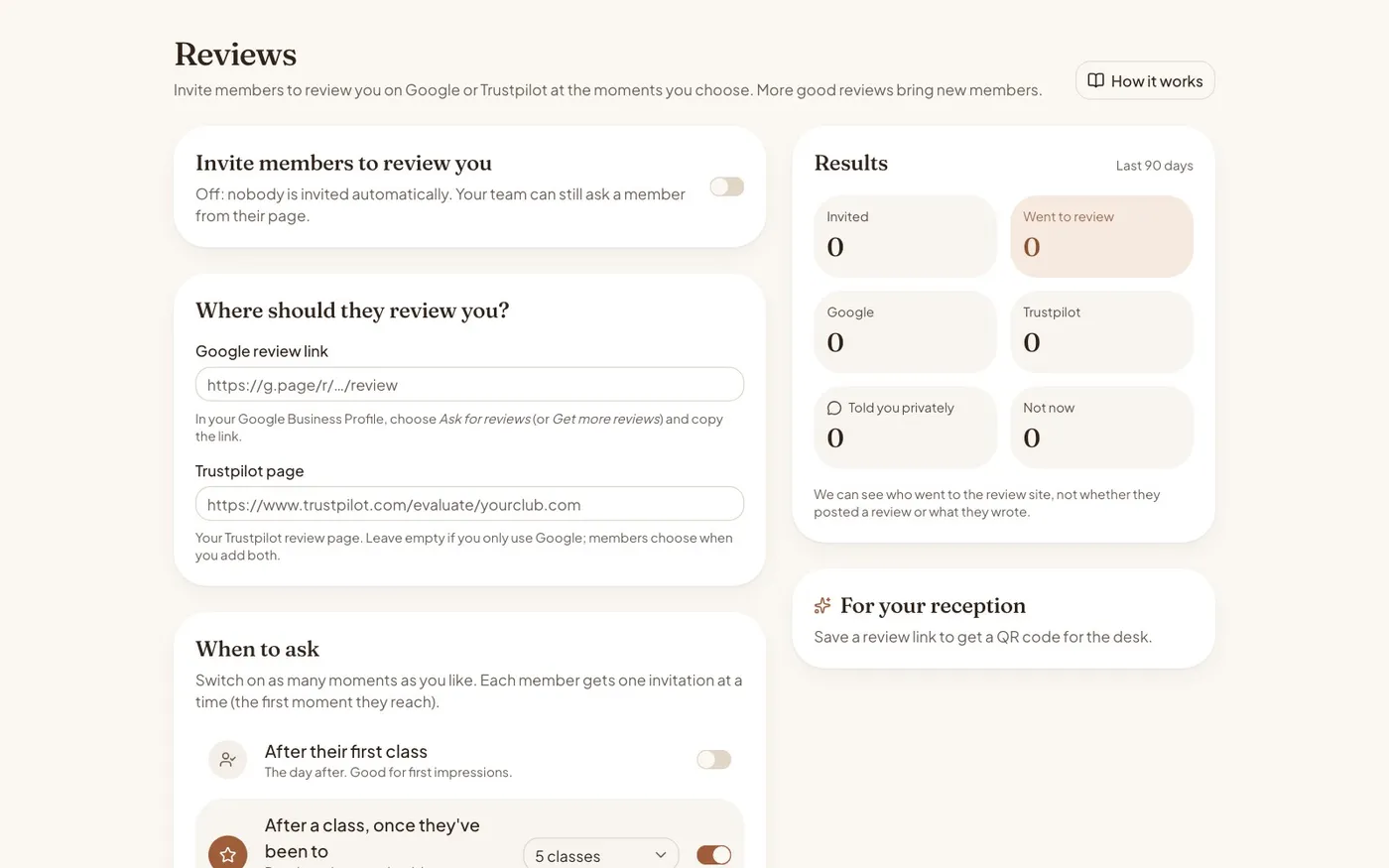
MOTVIVO sends review invitations for Google or Trustpilot to your members at the moments you choose. Everyone invited gets the same choice: review, or tell you privately instead. Each morning, Today’s “Say hello” points out members who reached a milestone class or came back after a while, with the message already prepared for you to send, often the right moment to ask. It never adds rewards to review invitations; rewards belong to challenges and refer-a-friend. See marketing and growth in MOTVIVO.
Questions
How do I get more Google reviews for my gym fast?
Start this week. Copy your review link from your Google Business Profile, then message ten regulars who recently hit a milestone or said something kind, personally and with the link. Repeat every week. A steady flow of genuine reviews looks better to readers and to Google than a sudden burst, and is less likely to be filtered.
Can I offer a free class in exchange for a Google review?
No. Google’s policies prohibit offering incentives such as free or discounted services in exchange for reviews, or for changing or removing one. That includes free classes, discounts and prize draws. Google can remove those reviews and restrict your profile. You can still reward referrals and challenges; just keep any reward completely separate from reviews.
Is it allowed to ask only my happy members for a review?
No. Google’s policy says businesses must not selectively ask for positive reviews or discourage negative ones. This is called review gating. Choosing good moments to ask, like a milestone class, is fine, but send the same invitation with the same Google link to every member who reaches that moment, whatever you think they’ll write. You can offer private feedback alongside it.
Why did a member’s Google review disappear?
Google filters reviews that its systems think may not be genuine, and it doesn’t explain each case. Owners often see this when several reviews come from the studio’s Wi-Fi, from one shared device, or all at once. Ask members to review from their own phone, on their own connection, and spread your invitations out. Some filtered reviews reappear later; others don’t.
Should I reply to every Google review?
Reply to every negative review and to as many positive ones as you can, with something specific rather than a copied line. Google says you don’t need to thank every reviewer, but replies show future members that a real person cares. Keep them short, sign with your name, never include offers or a reviewer’s private details, and reply within a few days.