 MOTVIVO
Features · AI assistants
Ask your club anything, in Claude or ChatGPT
Connect MOTVIVO to the AI app you already use. Ask about bookings, money and members in your own words, in any language, and get the answer with a draft of what to do about it. Included in every MOTVIVO plan.
How it feels
No exports, no spreadsheets, no reports to learn
Ask the way you’d ask a good manager. The answers come from your club’s data in MOTVIVO, as it is right now.
Which classes next week have the most free places, and who usually comes to them?
You get: the classes with the most places left, the members who come to them most often, and a short message you can send them.
Who hasn’t been in for a month but still has credits?
You get: a win-back list with each member’s credits and last visit, and a friendly note asking them back.
How do this month’s sales compare with last month, by product?
You get: a side-by-side of every product and pack, what grew, what dropped and where to look next.
What owners ask
From the morning check to the month-end summary
A few of the questions it answers. Ask your own: it understands the way you’d say it.
A Monday-morning briefing
“What should I know about this week?” Bookings against last week, empty places, waitlists, memberships ending and members going quiet, in one short read.
Fill next week’s classes
“Which classes have the most free places?” The emptiest classes and the regulars who’d likely come, with a message ready to send.
Win back quiet members
“Who stopped coming but still has credits?” Names, credits left and last visit, plus a note that sounds like you.
Packs and memberships ending
“Write a friendly note to members whose pack ends this week.” Who it is, what they have left, and a renewal note in your tone.
Sales, side by side
“How does this month compare with last month, by product?” Revenue by product, pack or payment method, for any two periods.
The month-end summary
“Summarise October for my accountant.” Revenue, VAT, payment methods and money still to collect, ready to forward.
Plan the timetable
“When are we busiest, and which classes are half empty?” Busy and quiet times by weekday and hour, and how full each class is, to decide what to move or add.
A trainer’s month
“How full were Sofia’s classes this month?” Each of their classes, how full it was, no-shows and late cancels.
In your own language
“Πόσες κρατήσεις έχουμε αύριο;” “Wie viele Buchungen haben wir morgen?” Ask in English, Greek, German or any language your AI app speaks.
What it can see
Everything you’d look up in MOTVIVO
It reads the same data you see in the staff app, with the same permissions.
Today and this week
- Places booked today and tomorrow
- Money in today, this month against last month
- New members and bookings, this week against last
- What’s worth doing today: empty places, waitlists, memberships ending, members going quiet
- For admins: the last 28 days against the 28 before, growth suggestions, busiest and quietest times
Every report, any period
- Revenue and VAT, sales by product and payment method
- Bookings, attendance, no-shows and late cancels
- How full each class is, by class, trainer, location, weekday or hour
- New members by where they came from
- Credits sold, used and expiring; discounts given; team tasks
Members
- Find anyone and see their memberships, credits left and end dates
- Visits, upcoming and past bookings, and what they owe
- Who hasn’t come for a while, and who has no membership
Timetable
- Classes and trainers for any day or week
- Places left and waitlists
- Who’s booked into a class
Money and the business
- Money to collect and company invoices waiting for payment
- Memberships and packs with their prices
- Your team
Getting started
Connected in three steps
No installation and nothing to set up in MOTVIVO beyond one switch.
Switch it on
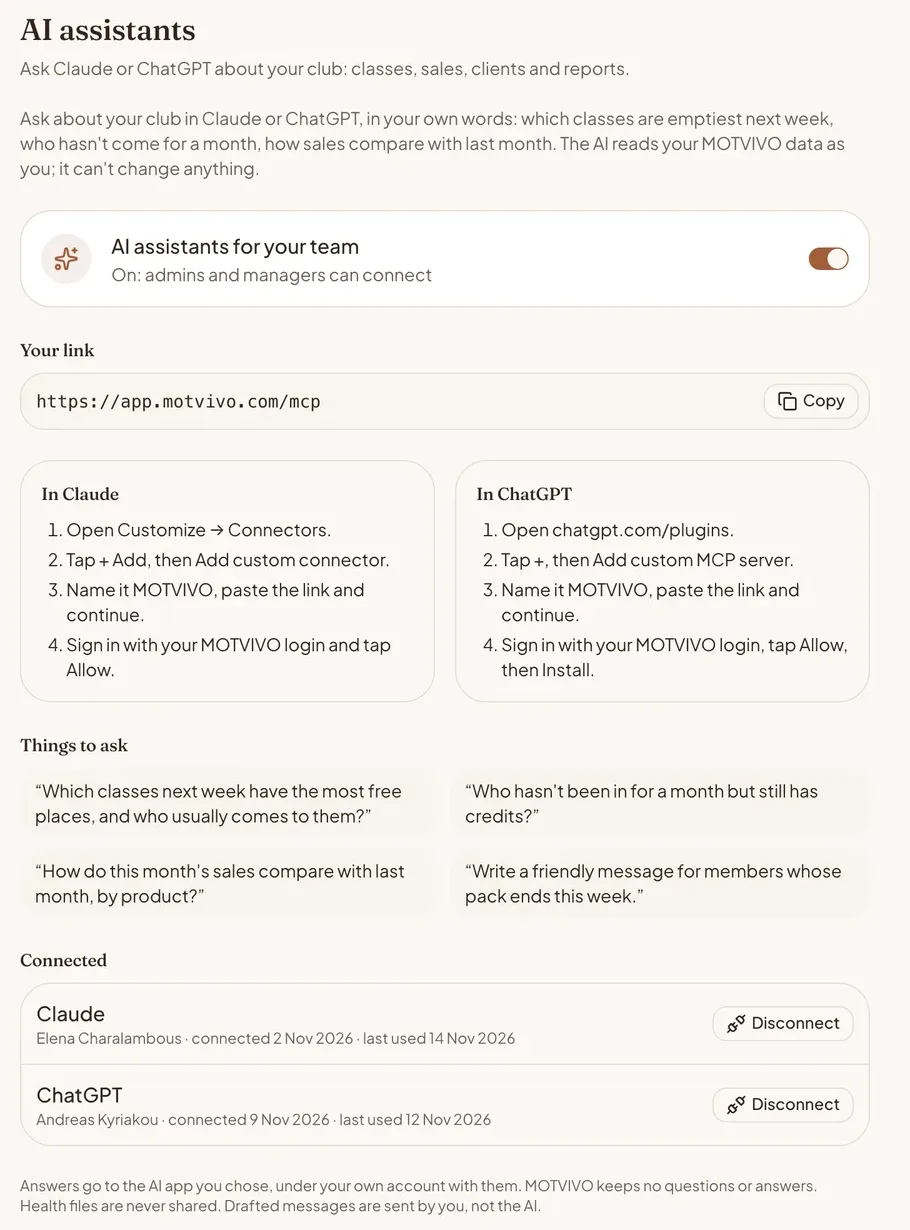
In MOTVIVO, go to Settings → AI assistants (or Settings → Features) and copy your link.
Add it to your AI app
In Claude: Customize → Connectors → Add custom connector. In ChatGPT: chatgpt.com/plugins → Add custom MCP server. Paste the link.
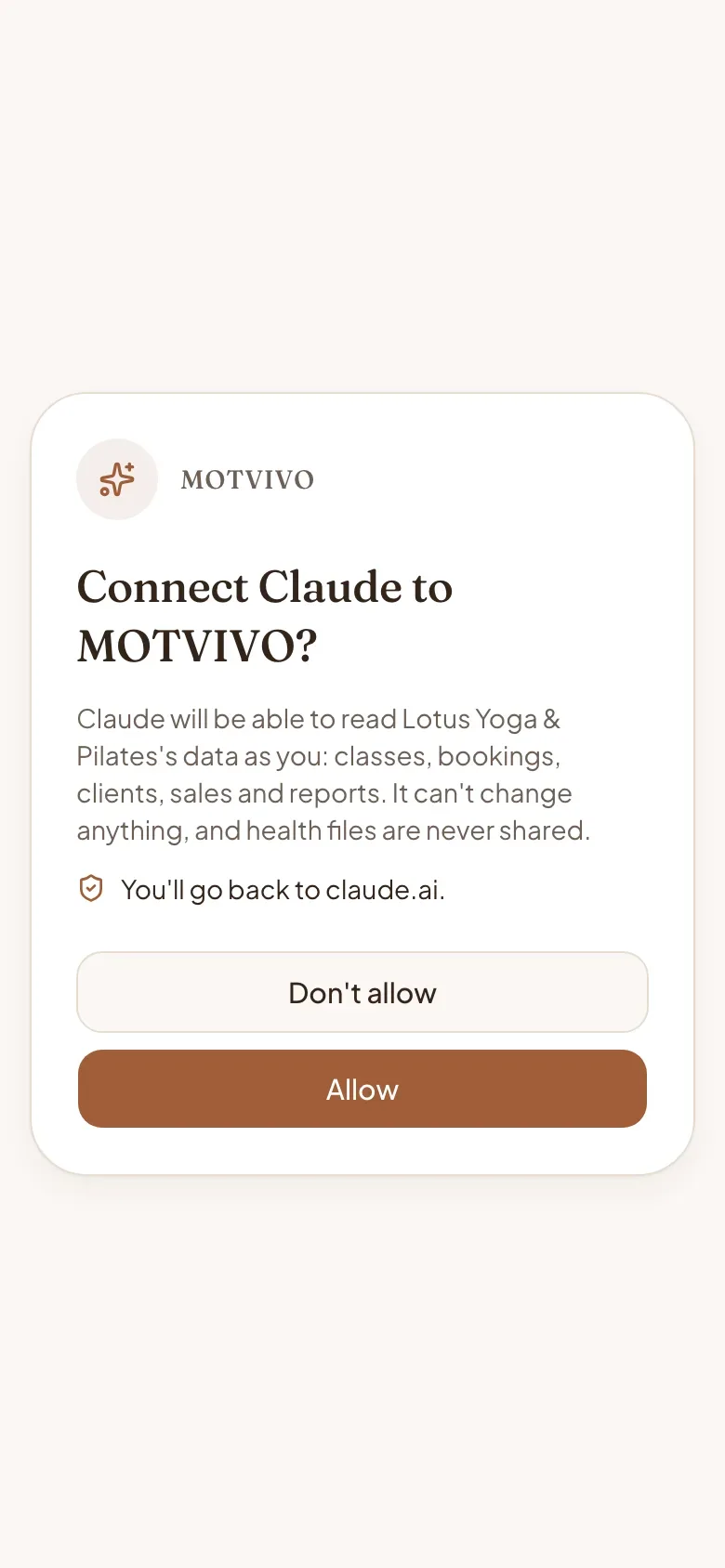
Sign in and tap Allow
Sign in with your usual MOTVIVO login and tap Allow. Then just ask.
See it
One switch, one link, one tap
Real screens from MOTVIVO.
Safe by design
Your data, your rules
It reads, it never acts. And you stay in control of who’s connected.
Read-only
The AI can look things up, never change them. It can’t book, refund, send or edit anything. Drafts it writes, you send yourself.
Your permissions, nothing more
It sees your club’s data as the person who connected, with that person’s permissions in MOTVIVO.
Admins and managers only
Only admins and managers can connect. Every connection is listed in Settings with a Disconnect button.
Health files stay private
Health files are never shared with an AI app.
Nothing kept by MOTVIVO
MOTVIVO keeps no questions or answers. They go to the AI app you chose, under your own account with that provider.
Off with one switch
Switching the feature off ends every connection at once.
Questions
What owners ask about AI assistants
Anything else? Book a demo and ask us directly.
Which AI apps does it work with?
Claude and ChatGPT. MOTVIVO connects through MCP, the open standard both of them support.
Which Claude and ChatGPT plans can I use?
In Claude, custom connectors work on the Free plan (one connector), Pro, Max, Team and Enterprise. In ChatGPT, adding a custom MCP server depends on your plan and workspace settings, so check under chatgpt.com/plugins.
Does it cost extra?
No. AI assistants are included in every MOTVIVO plan. You only need your own Claude or ChatGPT account.
Can the AI change anything in MOTVIVO?
No. It’s read-only: it can’t book, refund, send messages or edit anything. When it drafts a message, you decide whether to send it.
Who sees my club’s data?
Only the AI app you connected, under your own account and agreement with that provider. MOTVIVO keeps no questions or answers, and health files are never shared.
Who on my team can connect?
Admins and managers. Each sees only what they can see in MOTVIVO. You see every connection in Settings and can disconnect anyone. If someone stops being an admin or manager, is suspended or leaves, their connection ends for good; if they get the role back, they simply connect again.
Can I ask in Greek or German?
Yes. Ask in any language your AI app understands.
How do I switch it off?
Disconnect one person in Settings → AI assistants, or switch the feature off to end every connection at once.
Works well with
One system, every part connected
Each part of MOTVIVO knows about the others, so nothing is typed twice.
Reports & insights
Start every day with what needs you and what would help most. When you want the numbers, build the report you need in a few clicks.
Challenges & badges
Members bring friends, leave reviews at the right moment and come back for challenges and badges that reward the ones who keep showing up.
Your team
Trainers see their own classes on their phone, the front desk sees the day, and you see the hours. Everyone gets just what they need, and trainers who only teach are free.
Get started
Your booking page, live in five minutes.
Try it free for 14 days: tell us what you offer and your first class, and your members can book today. Prefer a walkthrough? Book a 20-minute demo.