 MOTVIVO
Indoor golf software
Booking software for indoor golf: bays, lessons and members in one app
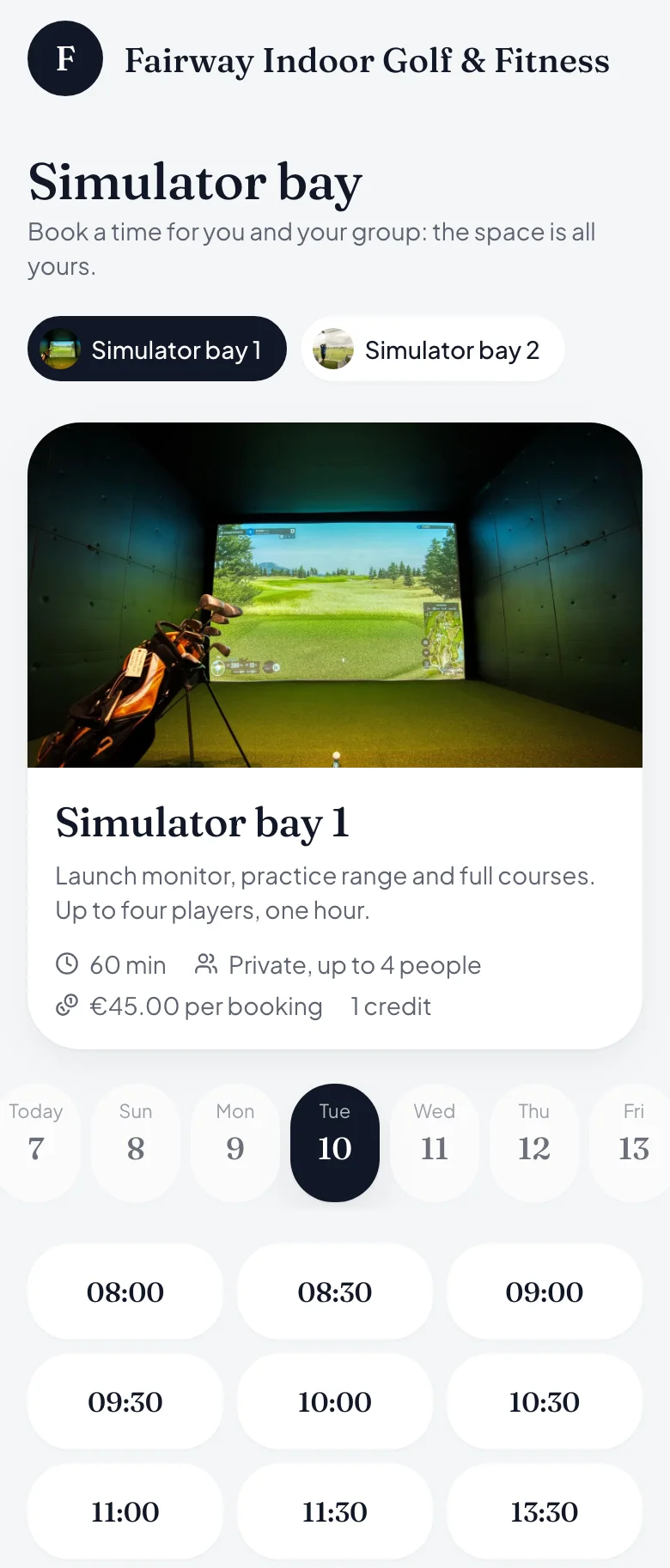
MOTVIVO is booking software for indoor golf venues and golf studios. Players see free simulator bays in your own booking app and book a bay by the hour in a few taps. They pay online, use hour packs, or play on a membership that includes bay hours. Your coaches’ lessons, golf fitness classes and gift vouchers run in the same app, so one system covers the whole venue.
Fairway Indoor Golf & Fitness is a demo club with sample players and bookings.
How it works
From an empty bay to a booked one
Set it up once. After that, players book themselves.
Set up your bays
Add each simulator bay with its opening hours, how long a booking is (for example 60 minutes), how often a booking can start and a few minutes between players if you need them. Mark a bay as private, so one booking takes it for the whole group.
Choose how players pay
A price per booking paid online, packs of bay hours, or memberships that include a number of hours a month. Payments go straight into your own Stripe account.
Players book on their phone
They see only the times that are free, book, and get a confirmation with an “add to calendar” link. Two people can’t take the same bay at the same time.
Run the day from one screen
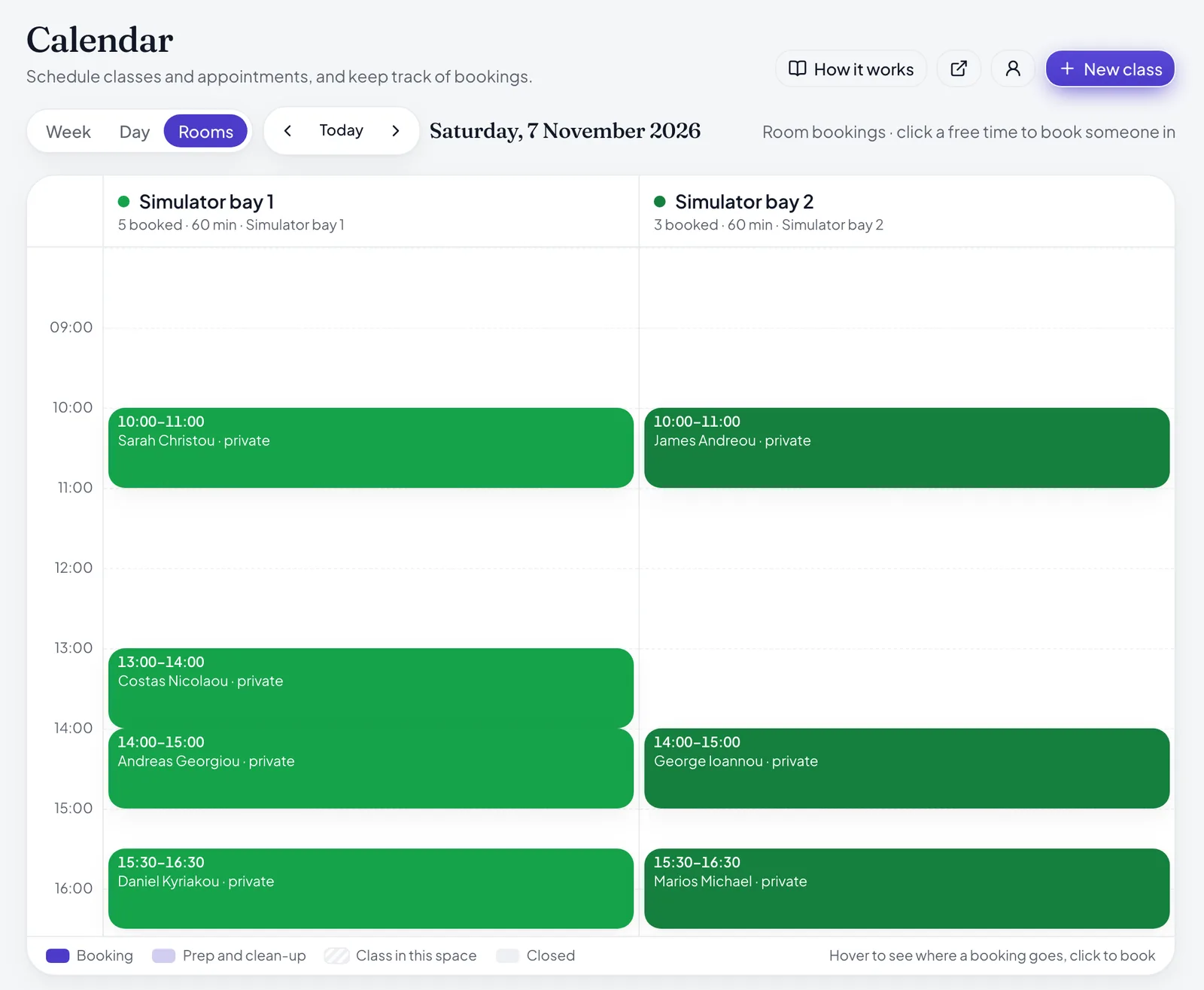
The Rooms calendar shows every bay side by side. A clinic or class in a bay blocks it automatically, and you book a walk-in from the desk in seconds. On Premier, each bay can also switch itself on 10 minutes before a booking and off 10 minutes after, through your own Shelly smart plugs or relays.
The whole venue
Lessons, fitness and the rest of the venue
Bays are only part of it: see how room and bay booking works, or every feature.
Memberships & hour packs
Monthly memberships with bay hours included, renewed by card, packs of hours for regulars and a price per booking for visitors. The app counts every hour.
Lessons with your coaches
Book lessons for players at the desk, once or every week, paid from lesson packs or a membership. Players can also ask for a lesson on your club website, and your team picks the time.
Golf fitness and Pilates
If you run classes, they’re in the same timetable and the same app, with waitlists and reminders that look after themselves.
Gift vouchers
Sold online and at the desk, and a popular present for golfers. The person who gets one redeems it in the booking app.
Challenges & badges
Challenges such as “8 bay sessions this month”, with a reward when players finish: a few free hours, a box of balls or just the badge.
Your club website
A website for your venue with live booking, included on every plan. Players book a bay straight from it.
Before you choose
What to look for in indoor golf booking software
Whichever system you choose, check these:
- No double bookings. The system should refuse two bookings for the same bay at the same time, also when two people book in the same second.
- Payment at booking. Bays that are paid for (or paid from a pack) when they’re booked are rarely left empty.
- A cancellation window. Decide how late players can cancel for free, and let the system apply it.
- Members’ hours. If you sell memberships, the system should count the bay hours included and stop at the limit.
- Lessons and play in one calendar, so a lesson never collides with open play.
- A booking app that works without a download, so a first-time player can book from a link or QR code.
- Simulator and door control, if you want unstaffed hours: ask exactly which hardware is supported and what happens when the internet is down.
- Try it yourself: book a bay on your own phone during the trial. If it isn’t obvious, your players will struggle too.
Honestly
What MOTVIVO doesn’t do (yet)
We’d rather you know before you start:
- No door locks or unstaffed access yet. Door codes for Nuki smart locks are being finished now.
- One price per bay: no automatic peak and off-peak prices yet. You can sell an off-peak pack or membership instead.
- A booking has a set length: players who want two hours book two times back to back.
- No leagues or outdoor tee sheets.
Can a group book one bay?
Yes. Mark the bay as private and one booking takes it for the group, up to the number of players you set.
Can members play included hours?
Yes. A membership can include a number of bay bookings a month, or unlimited, and the app counts them for you.
Can players pay online?
Yes, by card, Apple Pay or Google Pay, straight into your own Stripe account. You can also take payment at the desk.
Do players need to download an app?
No. Your booking app opens from a link or QR code in any phone browser, and players can add it to their home screen.
Does it work with TrackMan or other simulators?
Not with the simulator software itself: MOTVIVO handles bookings and payments. It can switch each bay’s power with the bookings, though: through your own Shelly plugs or relays, the bay turns on 10 minutes before a booking and off 10 minutes after (Premier plan). If the internet drops, the plug’s own timer still switches it off.
What does it cost?
Plans start at €19 a month, with 14 days free and no card needed. Bays, lessons and classes are included on every plan. See pricing.
Get started
Your booking page, live in five minutes.
Try it free for 14 days: tell us what you offer and your first class, and your members can book today. Prefer a walkthrough? Book a 20-minute demo.